> ## Documentation Index
> Fetch the complete documentation index at: https://docs.zbx.boomfi.xyz/llms.txt
> Use this file to discover all available pages before exploring further.
# Payment Links
> Create, share, and manage crypto payment links (one-time or recurring).
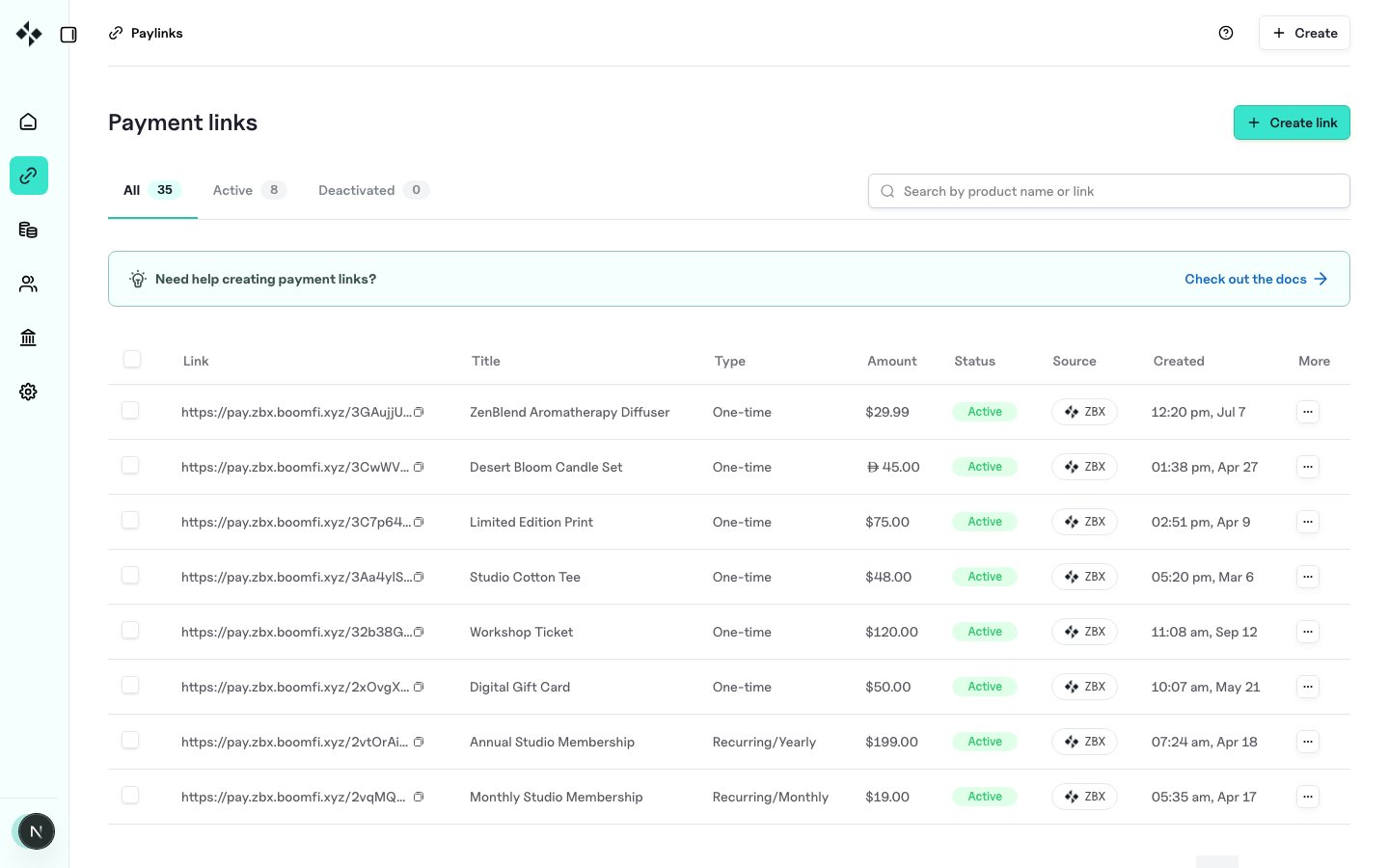
Payment links (paylinks) collect crypto payment without building your own checkout UI. Create them in the dashboard or via the API, then share the URL.
## Dashboard
1. Open `https://merchants.zbx.boomfi.xyz/dashboard/pay-links`
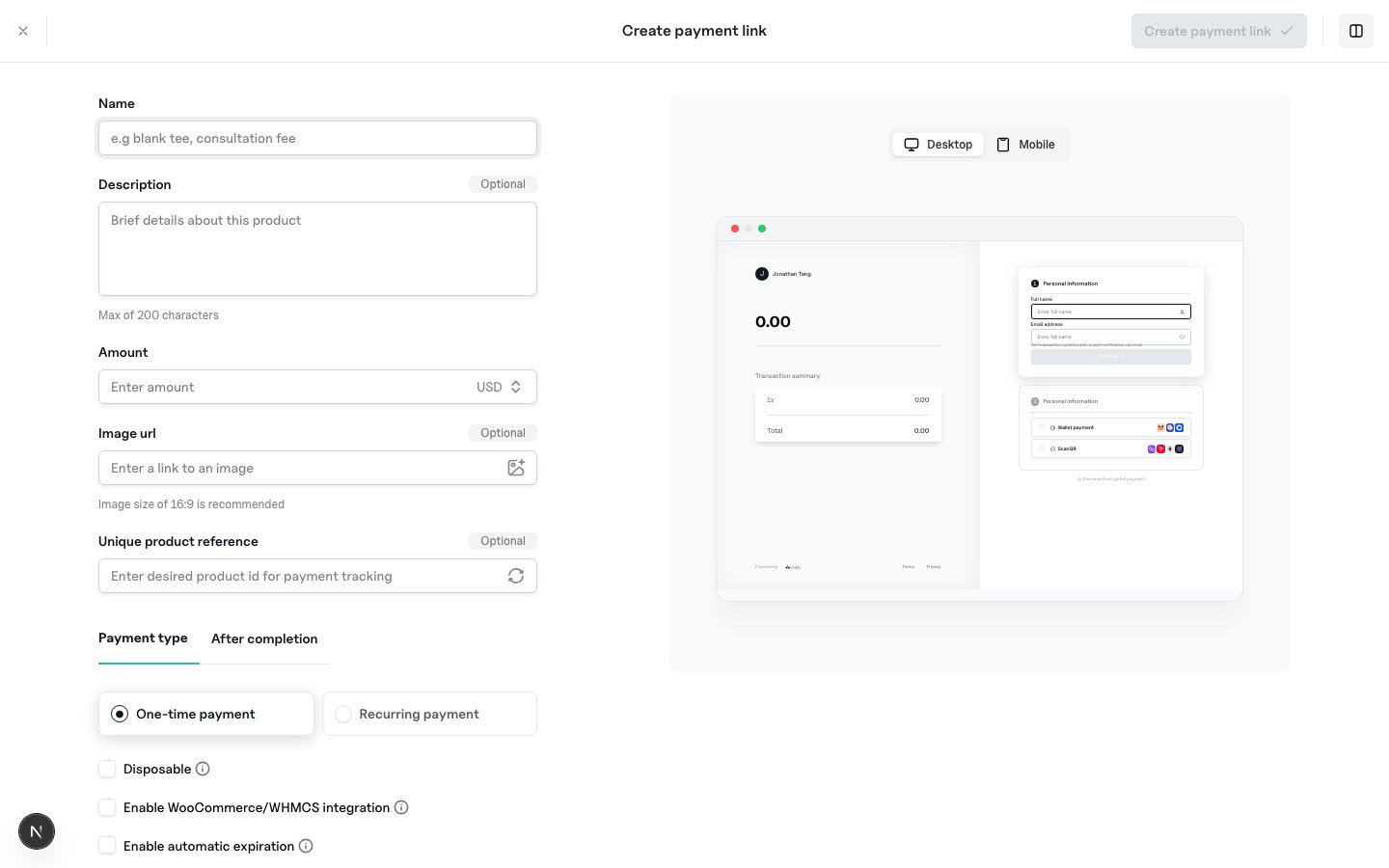
2. Create a pay link and enter name, amount, currency, payment type (one-time or recurring), and after-completion behaviour
3. Share the generated URL with your customer
 ## Create via API
```bash theme={null}
curl -X POST "https://mapi.zbx.boomfi.xyz/v1/paylinks" \
-H "X-API-KEY: sk_test_xxx" \
-H "Content-Type: application/json" \
-d '{
"name": "ZenBlend Aromatherapy Diffuser",
"description": "One-time purchase",
"amount": "29.99",
"currency": "USD",
"reference": "sku_diffuser_001",
"type": "OneTime"
}'
```
### Notable fields
| Field | Description |
| --------------------------------------------------- | ---------------------------------------------------------------------------------------- |
| `name`, `amount`, `currency` | Required |
| `type` | `OneTime` or `Recurring` (defaults from interval if omitted) |
| `interval`, `intervalCount` | Recurring cadence (`Day`, `Week`, `Month`, `Year`, …) |
| `account_ids` / `account_ref` | Settlement targets: see [Account-Specific Paylinks](/payments/account-specific-paylinks) |
| `available_quantity` | Remaining purchases; `1` for single-use |
| `expires_at` | Future expiry timestamp |
| `image_url`, `description`, `reference`, `metadata` | Presentation and bookkeeping |
## List and manage
```bash theme={null}
# List
curl "https://mapi.zbx.boomfi.xyz/v1/paylinks" \
-H "X-API-KEY: sk_test_xxx"
# Get one
curl "https://mapi.zbx.boomfi.xyz/v1/paylinks/{paylinkId}" \
-H "X-API-KEY: sk_test_xxx"
# Update
curl -X PATCH "https://mapi.zbx.boomfi.xyz/v1/paylinks/{paylinkId}" \
-H "X-API-KEY: sk_test_xxx" \
-H "Content-Type: application/json" \
-d '{"enabled": false}'
```
Batch update/delete endpoints are also available under `/paylinks/batch`. Variant URLs can be generated for specialised checkout flows (`/paylinks/generate-variant/{paylinkId}`): see [Paylink Features](/payments/paylink-features).
## Events
Successful customer payment arrives as `Payment.Updated` with status `Succeeded`. Creating or updating plans/paylinks can emit `Plan.Created` / `Plan.Updated`. See [Event Types](/webhooks/event-types).
## Next steps
* [Paylink Features](/payments/paylink-features) (prefill, redirects, variants)
* [Account-Specific Paylinks](/payments/account-specific-paylinks)
* [Checkout](/payments/checkout)
* [Cookbook: Sell a Product](/payments/cookbook-sell-product)
## Create via API
```bash theme={null}
curl -X POST "https://mapi.zbx.boomfi.xyz/v1/paylinks" \
-H "X-API-KEY: sk_test_xxx" \
-H "Content-Type: application/json" \
-d '{
"name": "ZenBlend Aromatherapy Diffuser",
"description": "One-time purchase",
"amount": "29.99",
"currency": "USD",
"reference": "sku_diffuser_001",
"type": "OneTime"
}'
```
### Notable fields
| Field | Description |
| --------------------------------------------------- | ---------------------------------------------------------------------------------------- |
| `name`, `amount`, `currency` | Required |
| `type` | `OneTime` or `Recurring` (defaults from interval if omitted) |
| `interval`, `intervalCount` | Recurring cadence (`Day`, `Week`, `Month`, `Year`, …) |
| `account_ids` / `account_ref` | Settlement targets: see [Account-Specific Paylinks](/payments/account-specific-paylinks) |
| `available_quantity` | Remaining purchases; `1` for single-use |
| `expires_at` | Future expiry timestamp |
| `image_url`, `description`, `reference`, `metadata` | Presentation and bookkeeping |
## List and manage
```bash theme={null}
# List
curl "https://mapi.zbx.boomfi.xyz/v1/paylinks" \
-H "X-API-KEY: sk_test_xxx"
# Get one
curl "https://mapi.zbx.boomfi.xyz/v1/paylinks/{paylinkId}" \
-H "X-API-KEY: sk_test_xxx"
# Update
curl -X PATCH "https://mapi.zbx.boomfi.xyz/v1/paylinks/{paylinkId}" \
-H "X-API-KEY: sk_test_xxx" \
-H "Content-Type: application/json" \
-d '{"enabled": false}'
```
Batch update/delete endpoints are also available under `/paylinks/batch`. Variant URLs can be generated for specialised checkout flows (`/paylinks/generate-variant/{paylinkId}`): see [Paylink Features](/payments/paylink-features).
## Events
Successful customer payment arrives as `Payment.Updated` with status `Succeeded`. Creating or updating plans/paylinks can emit `Plan.Created` / `Plan.Updated`. See [Event Types](/webhooks/event-types).
## Next steps
* [Paylink Features](/payments/paylink-features) (prefill, redirects, variants)
* [Account-Specific Paylinks](/payments/account-specific-paylinks)
* [Checkout](/payments/checkout)
* [Cookbook: Sell a Product](/payments/cookbook-sell-product)