> ## Documentation Index
> Fetch the complete documentation index at: https://docs.zbx.boomfi.xyz/llms.txt
> Use this file to discover all available pages before exploring further.
# Authentication
> API keys, request signing secrets, and how secured Merchants API calls work.
The Merchants API authenticates server requests with an API key. Sensitive write endpoints that manage virtual accounts, deposits, and payouts also require request-level HMAC signatures.
## API keys
Create and revoke keys in **Settings → API & Webhook → API Keys**:
`https://merchants.zbx.boomfi.xyz/dashboard/settings/api-keys`
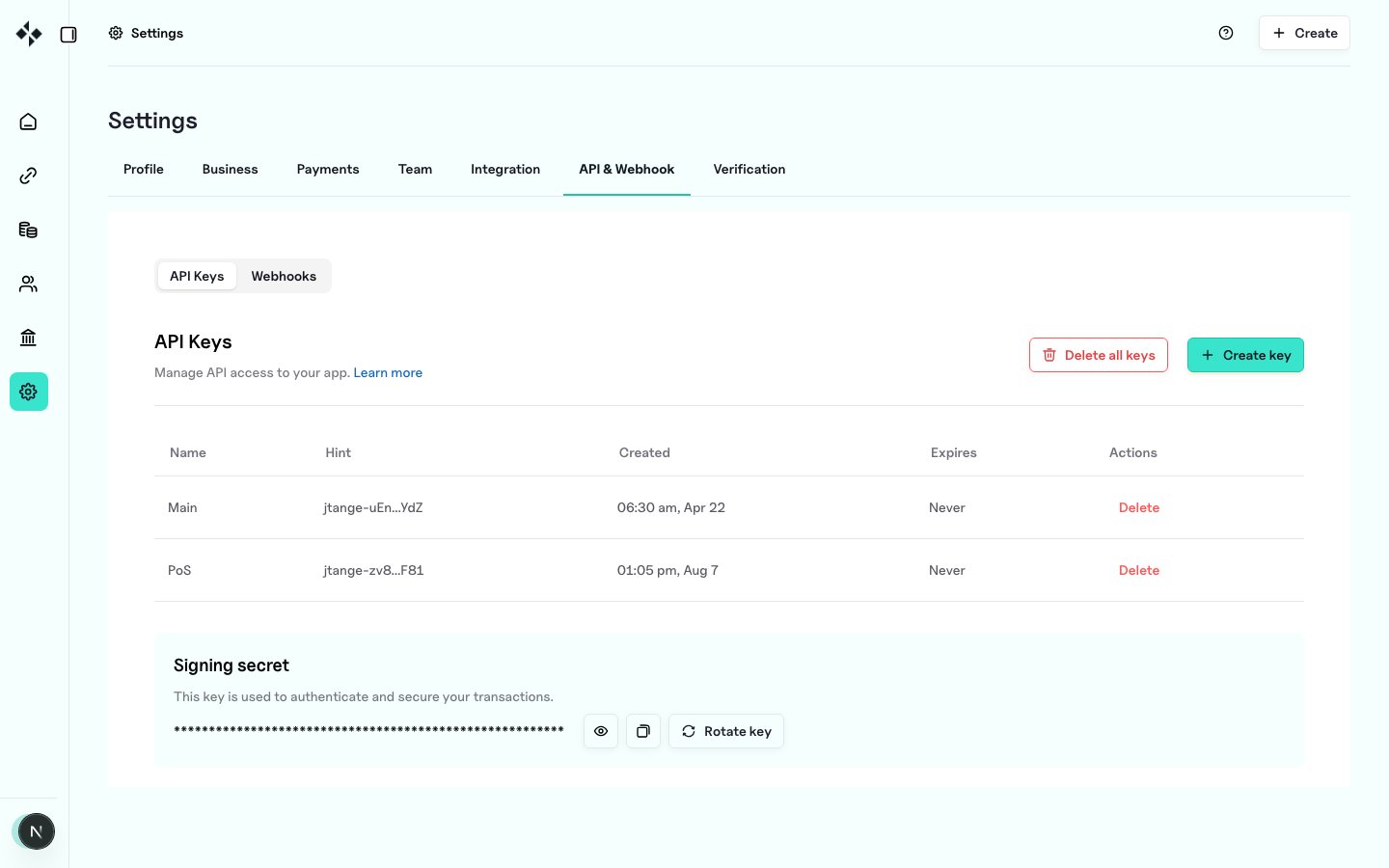 The full secret is shown **once** when the key is created. Store it in a secrets manager. ZBX cannot recover a lost key: rotate (create a new key and revoke the old one) if it is compromised.
Send the key on every request:
```bash theme={null}
curl "https://mapi.zbx.boomfi.xyz/v1/orgs" \
-H "X-API-KEY: sk_test_xxx" \
-H "Accept: application/json"
```
### Best practices
* Never commit keys to source control or ship them in browser code
* Prefer separate keys per environment and service
* Rotate keys on a schedule and after personnel changes
## Request signing (HMAC)
Some endpoints declare authentication as **API key + nonce + signature**. Those include permanent pay-in addresses and payouts. Creating or updating a virtual account itself is API-key only unless the operation schema says otherwise.
Required headers when signature verification is enforced:
| Header | Value |
| ----------------- | --------------------------------------------- |
| `X-API-KEY` | Your API key |
| `X-API-Nonce` | Unique string per request (replay protection) |
| `X-API-Signature` | Hex-encoded HMAC-SHA256 (see below) |
Retrieve or rotate the org **request-signing secret** (HMAC secret for API calls, not the webhook key pair):
```bash theme={null}
# Get signing secret
curl "https://mapi.zbx.boomfi.xyz/v1/orgs/signing-secret" \
-H "X-API-KEY: sk_test_xxx"
# Rotate signing secret
curl -X PATCH "https://mapi.zbx.boomfi.xyz/v1/orgs/signing-secret" \
-H "X-API-KEY: sk_test_xxx"
```
### How the signature is computed
The message is the concatenation of:
```
HTTP_METHOD + URL_PATH + NONCE + QUERY_STRING + RAW_BODY
```
Examples:
* `POST` + `/v1/accounts/virtual/payin/address` + `nonce-abc` + \`\` + `{"chain_id":8453,"reference":"customer-123"}`
* Query string is the raw query without `?` (empty when none)
Then:
```text theme={null}
X-API-Signature = hex(HMAC_SHA256(signing_secret, message))
```
Each nonce may be used once per organisation (recent nonces are rejected as reuse).
```javascript theme={null}
import crypto from "crypto";
function signRequest({
method,
path, // e.g. "/v1/accounts/virtual/payin/address"
nonce,
query = "",
body = "",
signingSecret,
}) {
const message = `${method}${path}${nonce}${query}${body}`;
return crypto
.createHmac("sha256", signingSecret)
.update(message)
.digest("hex");
}
```
`/v1/orgs/signing-secret` is exempt from request signature checks so you can obtain a secret on first run when signing is enforced.
## Webhook public key (different secret)
Webhook verification uses an **asymmetric RSA key pair** (public key in the dashboard). Do not use the HMAC request-signing secret to verify webhooks. See [Verify Webhook Signatures](/webhooks/verify-signatures).
## Next steps
* [Quickstart](/quickstart)
* [Settlement Overview](/settlement/overview)
* [Configure Webhooks](/webhooks/setup)
The full secret is shown **once** when the key is created. Store it in a secrets manager. ZBX cannot recover a lost key: rotate (create a new key and revoke the old one) if it is compromised.
Send the key on every request:
```bash theme={null}
curl "https://mapi.zbx.boomfi.xyz/v1/orgs" \
-H "X-API-KEY: sk_test_xxx" \
-H "Accept: application/json"
```
### Best practices
* Never commit keys to source control or ship them in browser code
* Prefer separate keys per environment and service
* Rotate keys on a schedule and after personnel changes
## Request signing (HMAC)
Some endpoints declare authentication as **API key + nonce + signature**. Those include permanent pay-in addresses and payouts. Creating or updating a virtual account itself is API-key only unless the operation schema says otherwise.
Required headers when signature verification is enforced:
| Header | Value |
| ----------------- | --------------------------------------------- |
| `X-API-KEY` | Your API key |
| `X-API-Nonce` | Unique string per request (replay protection) |
| `X-API-Signature` | Hex-encoded HMAC-SHA256 (see below) |
Retrieve or rotate the org **request-signing secret** (HMAC secret for API calls, not the webhook key pair):
```bash theme={null}
# Get signing secret
curl "https://mapi.zbx.boomfi.xyz/v1/orgs/signing-secret" \
-H "X-API-KEY: sk_test_xxx"
# Rotate signing secret
curl -X PATCH "https://mapi.zbx.boomfi.xyz/v1/orgs/signing-secret" \
-H "X-API-KEY: sk_test_xxx"
```
### How the signature is computed
The message is the concatenation of:
```
HTTP_METHOD + URL_PATH + NONCE + QUERY_STRING + RAW_BODY
```
Examples:
* `POST` + `/v1/accounts/virtual/payin/address` + `nonce-abc` + \`\` + `{"chain_id":8453,"reference":"customer-123"}`
* Query string is the raw query without `?` (empty when none)
Then:
```text theme={null}
X-API-Signature = hex(HMAC_SHA256(signing_secret, message))
```
Each nonce may be used once per organisation (recent nonces are rejected as reuse).
```javascript theme={null}
import crypto from "crypto";
function signRequest({
method,
path, // e.g. "/v1/accounts/virtual/payin/address"
nonce,
query = "",
body = "",
signingSecret,
}) {
const message = `${method}${path}${nonce}${query}${body}`;
return crypto
.createHmac("sha256", signingSecret)
.update(message)
.digest("hex");
}
```
`/v1/orgs/signing-secret` is exempt from request signature checks so you can obtain a secret on first run when signing is enforced.
## Webhook public key (different secret)
Webhook verification uses an **asymmetric RSA key pair** (public key in the dashboard). Do not use the HMAC request-signing secret to verify webhooks. See [Verify Webhook Signatures](/webhooks/verify-signatures).
## Next steps
* [Quickstart](/quickstart)
* [Settlement Overview](/settlement/overview)
* [Configure Webhooks](/webhooks/setup)